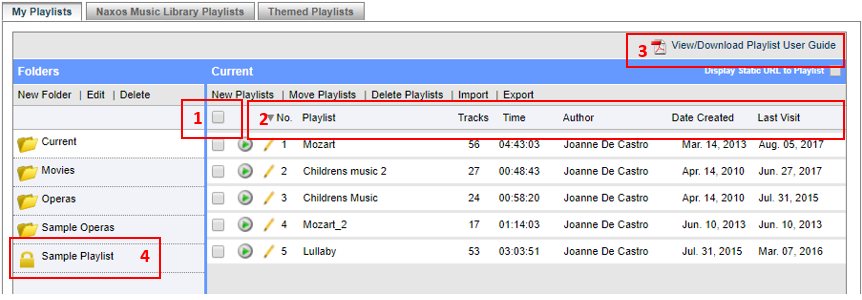
Folder View
1. Click on Select All to select all playlist.
2. Click on column header to sort.
3. Click on View/Download Playlist User Guide to download PDF file for reference.
4. The lock icon indicates that you need password to access the folder.
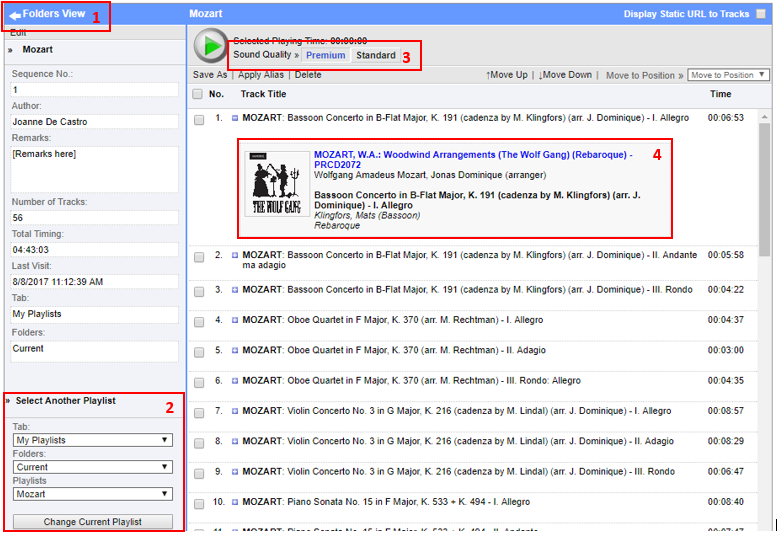
Tracks View
1. Click on Folder to go back to folder view.
2. Select the folder/playlist to view its track list (not currently being displayed).
3. View Total playing time display. Select sound Quality to Premium/Standard. CD quality is available depending on NML subscription.
4. Shows link to CD where track was taken from. Also shows track composer and artists. About this Recording link may be available.
0 Comments